r/DigitalArt: 800,000 Digital Artists, One Endless Scroll
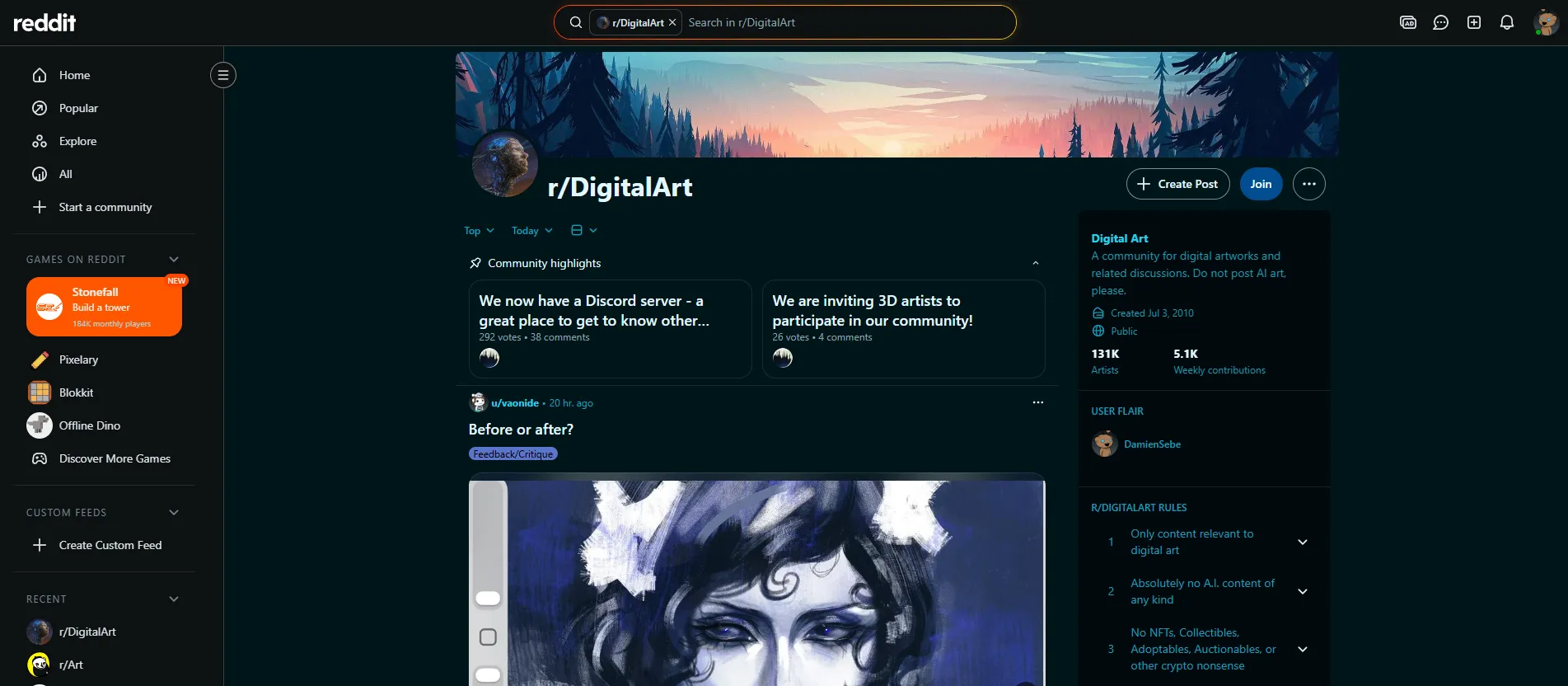
With approximately 803,000 members as of mid-2026, r/DigitalArt is the largest Reddit community dedicated specifically to digital art. Founded in 2009, it has grown into a massive showcase feed where digital painters, illustrators, character designers, and hobbyists share finished work, discuss tools, and occasionally post process content that reveals how the magic happens.
The subreddit is a showcase-first community. Unlike r/learnart, which prioritizes learning and feedback, r/DigitalArt is primarily about sharing your best work and seeing what other digital artists are creating. This creates a constantly refreshing gallery across every conceivable style, subject, and skill level, but it also means the feedback culture is shallower than in learning-focused communities.
The Feed: What You Actually See
Scroll through r/DigitalArt on any given day and you will encounter a hyperrealistic digital portrait painted in Photoshop, a stylized anime character from Clip Studio Paint, a surreal landscape composed in Procreate, a pixel art scene, and an abstract generative artwork, all within a few posts of each other. The visual diversity is the community's greatest strength: no algorithm is curating your feed based on past engagement, so you see work outside your usual aesthetic bubble.
The community's posting guidelines encourage members to include information about the software and tools used to create each piece. This practice transforms every post into a soft tool recommendation. When you see a stunning piece of character art and notice the artist used Clip Studio Paint with a Wacom Cintiq, that context is immediately useful for anyone considering those tools. Over time, browsing the subreddit builds a practical understanding of what different software and hardware combinations can achieve.
The community also bans AI-generated content, consistent with the broader trend across art subreddits. The rule is stated plainly in the community description: "Do not post AI art."
Process Content: The Hidden Value
While finished artwork dominates the feed, r/DigitalArt also values process content: time-lapse videos, work-in-progress shots, layer breakdowns, and step-by-step explanations of how a piece was created. These posts tend to generate high engagement because they satisfy a universal curiosity about how impressive artwork comes together.
Process posts are particularly valuable for intermediate artists who can draw competently but struggle to achieve the polished, professional look they see in finished work. Seeing the actual steps (the rough sketch, the value study, the color blocking, the rendering passes, the final adjustments) demystifies the gap between a blank canvas and a finished illustration. Many members report that watching process content on r/DigitalArt has been as educational as formal tutorials.
The community also hosts discussions about creative workflows: how artists organize their layers, what order they work in, how they handle revisions, and what techniques they use to maintain consistency across a series of illustrations. These practical, workflow-oriented discussions are difficult to find in tutorial-format content and represent one of the unique values of community-based learning.
Tool and Hardware Discussions
r/DigitalArt serves as an informal but highly active forum for discussing digital art tools. Members regularly post questions and recommendations about software, drawing tablets, displays, and accessories.
Software discussions cover the major applications with practical comparisons based on real-world usage:
- Photoshop: The industry standard for digital painting and illustration, but subscription-based and increasingly expensive
- Procreate: iPad-only, one-time purchase, beloved for its brush engine and simplicity
- Clip Studio Paint: Strong for manga and comic art, with specialized tools for panel layout, screentones, and perspective rulers
- Krita: Free and open-source, with surprisingly capable brush engines, though less polished than paid alternatives
- Affinity Photo: One-time purchase alternative to Photoshop, with growing adoption among cost-conscious artists
Hardware discussions address drawing tablets (Wacom, Huion, XP-Pen), display tablets, iPads with Apple Pencil, color-accurate monitors, and computer specifications needed for smooth performance with large canvases and complex brush engines. For artists making purchasing decisions, these community-sourced recommendations are often more useful than professional reviews because they reflect the priorities and experiences of actual working artists.
Community Events
The subreddit organizes recurring events:
- Monthly art challenges offer themed prompts that encourage members to explore subjects, styles, or techniques outside their comfort zone
- Software spotlight weeks focus community attention on specific digital tools, with members sharing work created in the featured application
- Tool Tuesday threads create dedicated spaces for hardware and software discussions, keeping the main feed focused on artwork
These events provide structure and motivation for creative practice, though they are less formalized than the events on learning-focused communities like r/learnart.
The Exposure Problem: Algorithmic Feeds vs. Chronological Discovery
One of the most underappreciated benefits of r/DigitalArt is its chronological, community-moderated feed. On Instagram, TikTok, and other algorithm-driven platforms, users tend to see content similar to what they have already engaged with, creating aesthetic echo chambers. r/DigitalArt's feed shows work across the full range of digital art styles: photorealism to abstraction, anime to Art Nouveau, concept art to editorial illustration.
This exposure is particularly valuable for developing artists who are still finding their own style and voice. Seeing work outside your usual aesthetic references expands your visual vocabulary and challenges assumptions about what digital art can look like.
Networking and Professional Opportunities
While r/DigitalArt is not primarily a professional networking platform, it facilitates connections that can lead to opportunities. Artists who post consistently and engage with the community build recognition and relationships. Collaboration proposals, commission requests, and freelance inquiries sometimes emerge from community interactions.
Industry professionals, including art directors, game developers, publishers, and agency recruiters, browse art communities like r/DigitalArt as part of their talent discovery process. While this is not a reliable path to employment, maintaining a visible presence in active art communities increases the chances of being noticed.
r/DigitalArt vs. Other Digital Art Communities
- r/Art (22M members) is larger but covers all media, not just digital
- r/learnart (1.7M members) is better for feedback and learning resources
- r/ConceptArt (160K members) is focused on entertainment industry concept art specifically
- ArtStation is the professional portfolio platform, but not a discussion community
- DeviantArt is older and larger but has declined in relevance for professional digital artists
r/DigitalArt's advantage is its size and focus on digital art specifically. Its disadvantage is that the showcase format means feedback is often shallow compared to learning-focused communities.
Insider Tips for Getting the Most Out of r/DigitalArt
- Always include your software and tools in the post title or body. This is both a community requirement and a way to attract engagement from artists using the same tools.
- Post process content alongside finished work. Process posts generate different kinds of engagement and are more educational for the community. They also tend to perform well in terms of upvotes.
- Sort by "New" to discover emerging artists. The "Hot" feed tends to surface already-popular work. Sorting by "New" shows you work that has not yet been discovered, which is where you find artists before everyone else does.
- Use the community for tool research before buying hardware. Search for "Wacom vs Huion" or "iPad Pro for digital art" and you will find dozens of threads with real user experiences.
- Do not expect deep critique. If you want detailed feedback, cross-post to r/learnart or r/ArtCritique. r/DigitalArt is better for exposure and inspiration than for improvement.
Who Is This For (and Who Should Look Elsewhere)
This is for you if: You are a digital artist who wants to share finished work with a large, active audience. You want exposure to diverse digital art styles and techniques. You are researching software or hardware purchases and want community-sourced opinions. You enjoy browsing an endless stream of digital art inspiration.
This is not for you if: You want detailed, constructive critique (use r/learnart). You are looking for career guidance in the entertainment industry (use r/ConceptArt). You work in traditional media (use r/painting). You need structured learning resources (use r/learnart or an online course). You post AI-generated art (it is banned).
Final Verdict: Who Is This Actually For?
r/DigitalArt is the largest digital art community on Reddit, and its value is directly tied to that size: more members means more work to see, more tool discussions to learn from, and more potential exposure for your own art. The trade-off is that large showcase communities do not provide the depth of feedback or community connection that smaller, learning-focused communities offer.
For digital artists who want a primary hub for sharing work, discovering new styles, and researching tools, r/DigitalArt is the default choice. For digital artists who want to improve their skills, it should be supplemented with r/learnart or dedicated courses. For digital artists pursuing entertainment industry careers, it should be supplemented with r/ConceptArt and ArtStation.
Next steps: Visit r/DigitalArt and browse the feed to see the range of work and tools represented. For skill development, check our art courses directory. For tool research, explore our art software directory for reviews of Procreate, Photoshop, Clip Studio Paint, Krita, and other digital art applications. You can also browse our YouTube channels directory for free digital art tutorials.